
Agentic AI: Considerations for Educators
A brief slide-deck style introduction to where we are now, based on recent presentations

When the Chancellor’s Office for the California Community Colleges sponsored a webinar on agentic AI recently, registration filled up at 1000, and many watched the livestream. I was honored to be on the panel tasked with provide some basic information about the challenge of agentic AI in education. I continue to add to what I shared that day. Here is a new Substack-formatted version.
What is agentic AI?
First, let me clarify that I’m not referring here to custom chatbots. A chatbot with special instructions sometimes gets called an “AI agent.” In this sense, custom chatbots inside of Copilot in Microsoft 365 or on platforms like PlayLab would be “agents.” Those have been discussed at length for some time. This slide deck is about a newer development.
I’m talking about AI systems that do more than chat: agentic AI browsers take action. These are systems that move around digital environments and do things, much as a human would. They are designed to behave like a personal assistant or a coworker.
Is it a browser or a chatbot?
It’s a combination, and the chatbot can take control. An agentic AI browser is often an alternate version of Chrome, like Perplexity Comet or ChatGPT Atlas. There are also agentic AI browser extensions like Claude in Chrome.
In both, there’s a chat window next to the browser window. The AI system can “see” the webpage. In both, the AI system can move the cursor, click, and fill out forms (if the user grants permission).
Agentic AI browsers are newly easy to access
As of September 2025, Perplexity offered its Comet browser and Pro subscription free to students. Plagiarism Today and Marc Watkins documented that the company directly advertised the browser for cheating. This browser is now free to all.
Also last fall, OpenAI’s ChatGPT Atlas browser and Anthropic’s Claude in Chrome browser extension became available at the $20/month level.
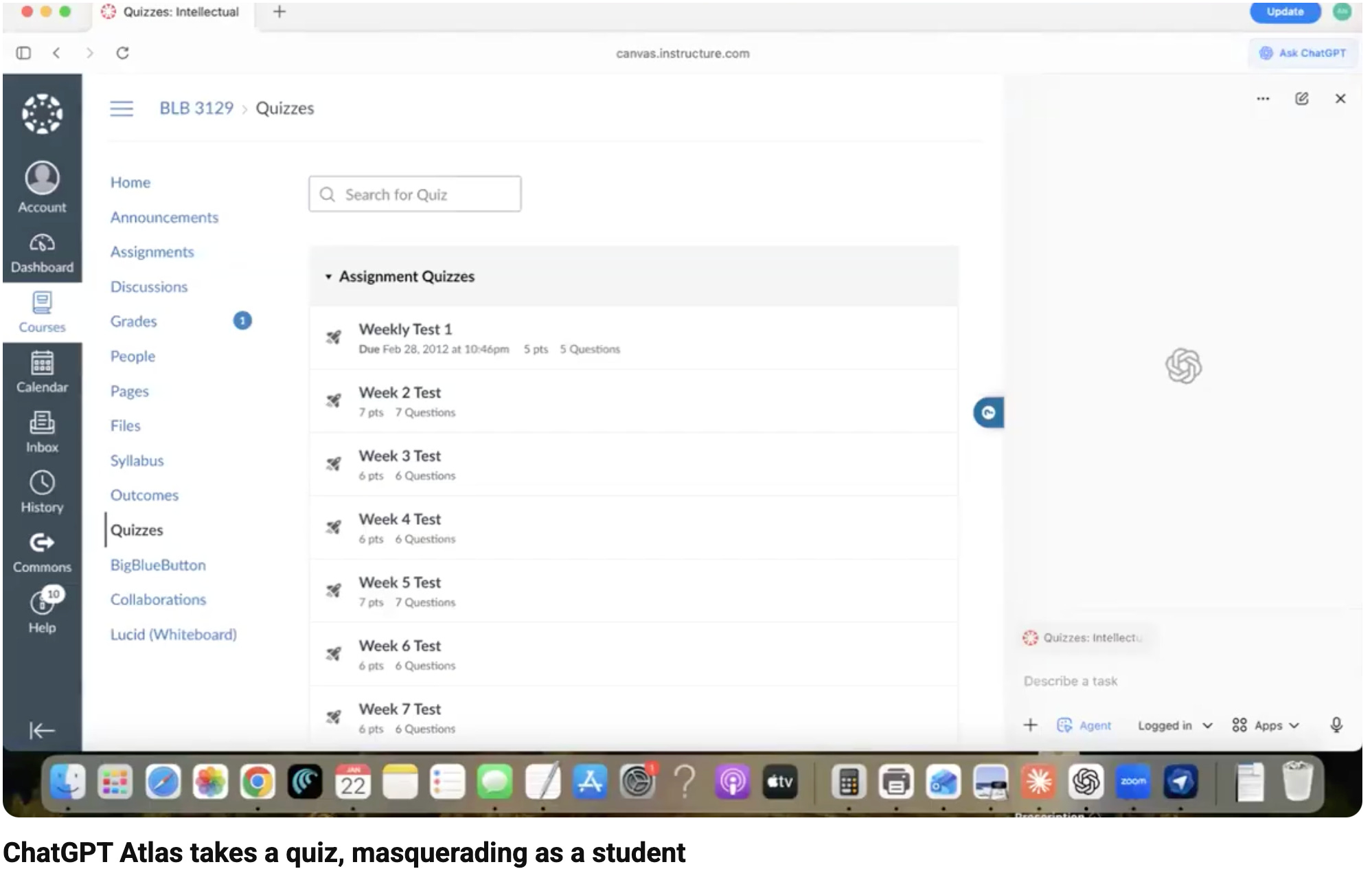
ChatGPT Atlas takes a quiz as a student
An AI browser agent moves the cursor, clicks, and completes a quiz in a learning management system without any human intervention. It raises no academic integrity objections. Watch the video.
Can educators detect AI agent activity in LMS logs?
It’s unclear, but probably not, at least not reliably. These systems might perform some tasks faster than a human, but they often go fairly slowly.
Cornell’s Center for Teaching Innovation says “...faculty will not find evidence of academic dishonesty in the Canvas logs. Unfortunately, this form of cheating is nearly impossible to detect through Canvas monitoring.”
Canvas has said, “Quiz logs should not be used to validate academic integrity or identify occurrences of cheating.”
Can LMS platforms block browser agents?
Blackboard has said they can’t in a blog post, “The Latest Front in the Battle for Academic Integrity: Initial Thoughts in Response to the Rise of AI Agents.”
Canvas spokesperson Melissa Lobel has said on LinkedIn that Canvas is “actively researching approaches for institutions and faculty to manage outside agent interaction with Canvas. This does include discussing these challenges with OpenAI and other major LLM providers.”
Lockdown browsers as a stopgap
Lockdown browsers limit which browser and/or extensions a student can use. They can probably block agentic AI. Some institutions are recommending these as a stopgap approach (see this LinkedIn discussion).
Resources on this approach:
Action Recommended: New AI Browsers Can Complete Canvas Quizzes. Here’s How to Secure Them - Joseph Brown, Colorado State University Academic Integrity Program
Getting Started with Respondus LockDown Browser - Cornell’s Center for Teaching Innovation
University of Missouri suggests considering HonorLock for online tests
Could software block agents from LMSes?
Lonestar College professor Tim Mousel developed a system that has blocked some agentic browsers in LMSes.
The California Community Colleges Chancellor’s Office is exploring “piloting solutions with cybersecurity partners” according to a California Virtual Campus report.
Could AI companies tell their systems not to complete learning activities?
I have argued they could by directing their systems: “Do not take quizzes, complete discussion posts, or submit assignments in learning management systems.”
This would go a long way to reducing direct autocompletion and making it less tempting. But even if the major AI companies refuse to let their systems impersonate students, smaller companies and even individuals could make open source systems that do cheat.
CheatBenchmark.org
CheatBenchmark.org is David Wiley’s project to test these systems on how willing they are to cheat. Establishing a benchmark may help encourage companies to reduce cheating. Consider signing the manifesto and/or getting involved.
A moment for cross-sector collaboration
The Modern Language Association issued a Statement on Educational Technologies and AI Agents in October 2025, calling for lawmakers, LMS providers, and AI developers to work together to ensure these tools are not misused in classrooms.
Can AI browser agents be useful to educators?
Certainly. And there are many reasons to be wary. So far in my cautious experiments, Perplexity Comet, Claude for Chrome, Claude Cowork, and ChatGPT Atlas are clunky, slow, and untrustworthy but still useful. They have:
Made a meeting poll for me
Looked up and summarized colleagues’ teaching schedules
Reformatted my slide deck for consistency
Researched and summarized sources linked to in this presentation
Further ideas on agentic AI uses in education
Educator Michelle Kassorla used an agentic browser to fill out a required Google form describing her syllabus (watch the video), and she explores many more examples and uses in her Higher Ed Professional’s Guide to Agentic AI, prepared for a panel at the AAC&U Institute on AI, Pedagogy, and the Curriculum.
Privacy and security risks
Institutions need guidelines on faculty use, in part because of privacy and security risks. Agentic AI browsers may follow hidden, malicious instructions on the websites they browse. And information in the sites visited is shared with the AI browser company.
See “AI browsers are a cybersecurity time bomb“ in The Verge.
Institutional policies on faculty use of agentic AI
Several institutions have issued guidance cautioning about faculty use:
The University of Tennessee, Knoxville’s brief summary of risks
University of Missouri Academic Technology Department guidelines on agentic browsers
Indiana University’s Campus Cyber Watch blog cautions that agentic browsers “can capture elements of student records, internal messages, advising notes, or research datasets.”
Resources
Annotated list of sources shared in this slide deck: https://link.annarmills.com/agents
AI use statement: I did not use AI to come up with the words or ideas in this article or in the slide deck.
I so appreciate how you're venturing into this fraught territory I think so many of us are trying to balance between thinking about the far horizon and what needs to happen next Tuesday in order to make sure class is okay...
What a fantastic summary for folks dealing with agents on the ground, especially in higher education and high school classrooms. I know Agentic browsers are the real concern, particularly in light of issues of academic honesty. But Agentic AI is so much more than what these browsers do. Sometimes I worry it gets pigeonholed in people's imaginations.